
Do No Disturb+1.0 - Google Play
You'll be able to see results in few seconds.
Publisher Description
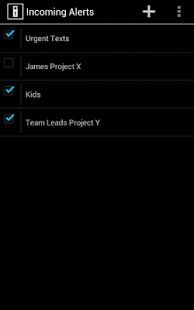
A new breed of Do Not Disturb apps: one that gives you ultimate, fine-grained control over what messages you are notified of when. Set your phone to silence or vibrate then create filters that will trigger an audible or vibrating alert when particular emails, texts, or phone calls come in. Designed to be simple yet powerful – it's like having a personal assistant monitor your incoming messages!
- create filters based on From:, Subject:, Body, or Contacts
- create powerful relationships between filters: AND/OR logic allows you to create fine-tuned triggers
- negative and positive filters: everything that includes “x”, but not that contains “y”
- set schedules so that alerts only trigger when you want: Between, All Except, and Anytime
- choose the alarm that is played when a message comes in: each alert can have its own alarm so you can instantly recognize by sound which alert was triggered
The possibilities are endless!
- Have all messages from a particular contact with certain subject or body alert you: for example all messages from your project lead with the subject of “Project X”.
- Want to enjoy a dinner or movie in peace but need to respond to any text or email that says “urgent”? Now you can.
- It even filters incoming calls: completely silence your phone but have have it vibrate if the boss or the answering service calls.
- At work and need to ignore your phone unless your kids or the school calls? Create a filter based on their contacts and a schedule of 9 – 5 then put your phone in your desk without worrying.
- Need to get sleep at night but still be available for certain people or messages? Silence your phone but create a filter that will play an audible alarm to wake you up if necessary.
This app is designed with a minimalist philosophy for security and efficiency. It does the most work with the least amount of resources consumed (saving your phone's battery) and the least possible permissions (saving your peace of mind).
Here are the permissions the app uses and why:
(RECEIVE_SMS) Your Messages: needed to filter the text of incoming SMS messages
(INTERNET, ACCESS_NETWORK_STATE) Network Communication: needed to access email messages
(READ_CONTACTS) Personal Information: needed to determine if the incoming text/call/or email is from a particular contact you select
(READ_PHONE_STATE) Phone Calls: needed to filter incoming calls
(WAKE_LOCK) System Tools: needed to prevent the phone from sleeping while we filter new messages
(VIBRATE) Hardware Controls: needed to make the phone vibrate
(GET_ACCOUNTS) Your Accounts: needed to enumerate the list of email accounts associated with the device
About Do No Disturb+
The company that develops Do No Disturb+ is b_android. The latest version released by its developer is 1.0.
To install Do No Disturb+ on your Android device, just click the green Continue To App button above to start the installation process. The app is listed on our website since 2013-03-21 and was downloaded 0 times. We have already checked if the download link is safe, however for your own protection we recommend that you scan the downloaded app with your antivirus. Your antivirus may detect the Do No Disturb+ as malware as malware if the download link to com.netfung.android.dnd is broken.
How to install Do No Disturb+ on your Android device:
- Click on the Continue To App button on our website. This will redirect you to Google Play.
- Once the Do No Disturb+ is shown in the Google Play listing of your Android device, you can start its download and installation. Tap on the Install button located below the search bar and to the right of the app icon.
- A pop-up window with the permissions required by Do No Disturb+ will be shown. Click on Accept to continue the process.
- Do No Disturb+ will be downloaded onto your device, displaying a progress. Once the download completes, the installation will start and you'll get a notification after the installation is finished.
Version History
version 1.0
posted on 2013-03-21
version 1.0
posted on 2013-03-21
Several fixes and updates
Disclaimer
Official Google Play Link
We do not host Do No Disturb+ on our servers. We did not scan it for viruses, adware, spyware or other type of malware. This app is hosted by Google and passed their terms and conditions to be listed there. We recommend caution when installing it.
The Google Play link for Do No Disturb+ is provided to you by apps112.com without any warranties, representations or guarantees of any kind, so access it at your own risk.
If you have questions regarding this particular app contact the publisher directly. For questions about the functionalities of apps112.com contact us.
